---
title: Use Any Template for Any Flow with Grid & Pixel (and Maximize Conversion Rates)
description: You don't want to put the wrong link in an email, or send customers to the wrong place, because your sales will take a hit that could have been easily avoide...
---
[Skip to content](https://help.gridandpixel.com/en-us/grid-and-pixel-help-center/strategy-guides/use-any-template-for-any-flow-with-grid-pixel-and-maximize-conversion-rates#main-content)
English - United States
Show submenu for translations
[](https://gridandpixel.com)
Open main navigation
Close main navigation
- English - United States
Show submenu for translations
- [Contact support](https://help.gridandpixel.com/en-us/grid-and-pixel-help-center/contact-us/contact-us)
[Contact support](https://help.gridandpixel.com/en-us/grid-and-pixel-help-center/contact-us/contact-us?hsLang=en-us)
Grid & Pixel Help Center
- There are no suggestions because the search field is empty.
1. [Grid & Pixel Help Center](https://help.gridandpixel.com/en-us/grid-and-pixel-help-center?hsLang=en-us)
2. [Shopify & Klaviyo Flows](https://help.gridandpixel.com/en-us/grid-and-pixel-help-center/shopify-klaviyo-flows?hsLang=en-us)
November 24, 2026
# Use Any Template for Any Flow with Grid & Pixel (and Maximize Conversion Rates)
## Adapt the product, copy, offer and destination to the flow’s trigger before reusing a design in a new lifecycle message.
You don't want to put the wrong link in an email, or send customers to the wrong place, because your sales will take a hit that could have been easily avoided.
**That’s why** [**Grid & Pixel**](https://www.gridandpixel.com/?utm_source=marketing&utm_medium=blog&utm_campaign=anytemplateanyflow)**’s AI engine makes it incredibly easy to pick an email graphic template and place the final design in *any* flow in Klaviyo or Shopify Email.**
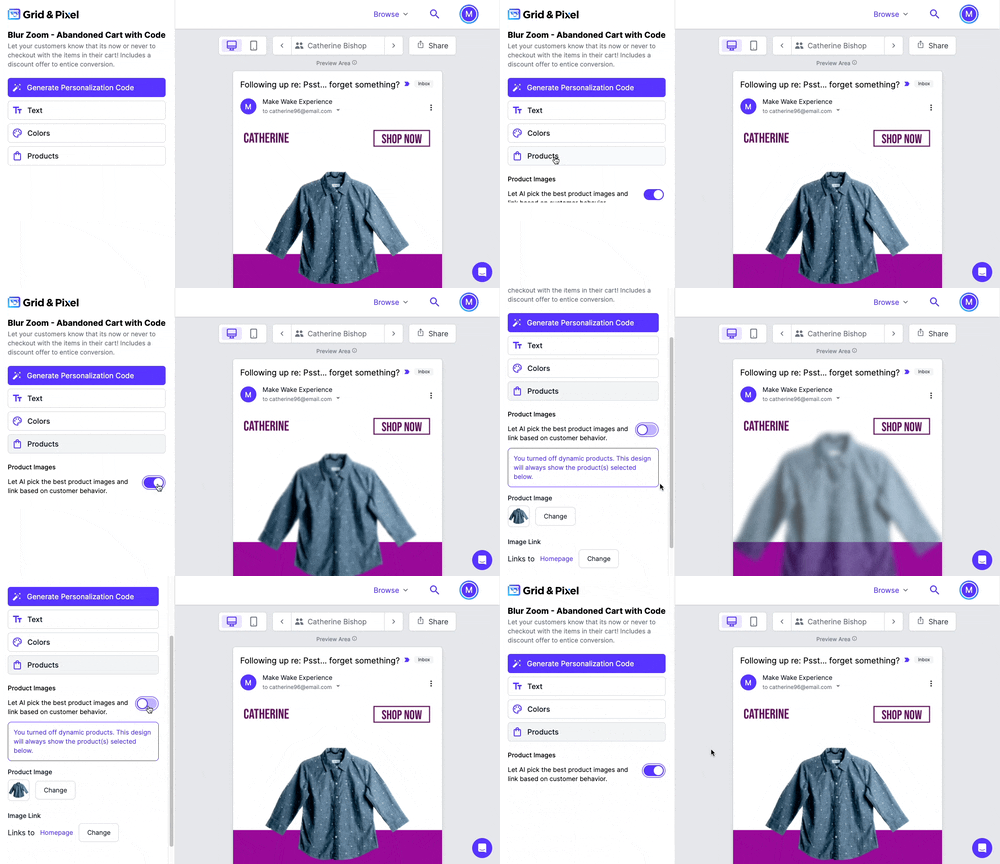
Our AI engine will decide what the best product imagery and link destination should be based on the flow that you put it in. You can take any of our templates and add it to any flow, and the content will be dynamic based on our AI engine’s determination of what the optimal images and links should be for that particular use case.
Every design has AI toggled "on" by default. The purple toggle will be pushed to the right to show AI is picking the best imagery and links for you. To turn it off, simply click the toggle and you can select specific imagery and a specific link.
### Ultimate Time-Saver: Every Template Fits Every Flow
Customer engagement platforms like Klaviyo and Shopify Email have a slew of complicated merge fields and code for different website and purchase events. The good news is that these allow for personalization, the bad news is that they can be pretty complex to wade through.
Forget about digging through documentation or trying to figure out what link should go in which email. It’s time-consuming and introduces room for error, which impacts your bottom line. Instead, we’ll handle that so you don’t leave money on the table — which is a *huge* win for email marketers.
You’ll notice some of our templates are labeled as “abandoned cart” or “winback,” but consider those inspirational starting points. You can customize any template to fit any flow, with a few tweaks to the graphic copy.
Then, just add your graphic to your email, and our code will handle the rest. It’ll show people the most optimal images based on the flow — like an image of the product that’s ready for refill on a replenishment flow — without you having to do anything else.
Here’s an example of one template being used for three different use cases:
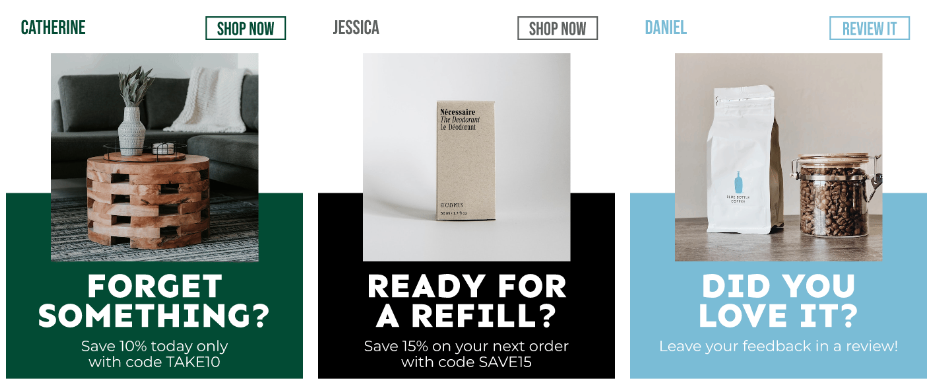
You can customize the *look* of the graphic to match your use case (e.g. abandoned cart vs. product review), but you don’t have to worry about figuring out where it should link or what product images to use. It’ll all be dynamic depending on where you slot the graphic.
**To read more about how personalization increases clicks and revenue,** [**read the full blog post here**](https://blog.gridandpixel.com/2023/08/24/show-the-best-products-maximize-conversion-rates-with-grid-pixel-ai?utm_source=helpcenter&utm_medium=article&utm_campaign=useanyflowanytemplate)**.**
[](https://gridandpixel.com)
[Contact Grid & Pixel support](https://help.gridandpixel.com/en-us/grid-and-pixel-help-center/contact-us/contact-us?hsLang=en-us)
[TikTok Shop tools](https://www.gridandpixel.com/tiktok) · [Klaviyo welcome flows](https://www.gridandpixel.com/welcome-series) · [AI email for Klaviyo](https://www.gridandpixel.com/ai-email-mcp)
[mailto:support@gridandpixel.com](mailto:support@gridandpixel.com)
Copyright © 2026 Grid & Pixel, Inc. All rights reserved.