---
title: How to Find Graphics to Customize
description: You've added the Grid & Pixel app, picked your plan, and you're ready to start customizing! Here's how you can find the perfect design:1. Open the Grid &...
---
[Skip to content](https://help.gridandpixel.com/en-us/grid-and-pixel-help-center/how-to-tutorials/how-to-find-graphics-to-customize#main-content)
English - United States
Show submenu for translations
[.png?width=226&height=35&name=Grid%20%26%20Pixel%20Logo%20(1).png)](https://gridandpixel.com)
Open main navigation
Close main navigation
- English - United States
Show submenu for translations
Grid & Pixel Support
- There are no suggestions because the search field is empty.
1. [Grid & Pixel Help Center](https://help.gridandpixel.com/en-us/grid-and-pixel-help-center?hsLang=en-us)
2. [How-To Tutorials](https://help.gridandpixel.com/en-us/grid-and-pixel-help-center/how-to-tutorials?hsLang=en-us)
July 30, 2026
# How to Find Graphics to Customize
## You've added the Grid & Pixel app, picked your plan, and you're ready to start customizing! Here's how you can find the perfect design:
You've added the Grid & Pixel app, picked your plan, and you're ready to start customizing! Here's how you can find the perfect design:
## [Copy link](https://help.gridandpixel.com/how-to-tutorials/how-to-find-graphics-to-customize?hsLang=en-us#h_9a49cca508)1. Open the Grid & Pixel app in Shopify or visit the Grid & Pixel homepage
If you open the app in [**Shopify**](https://apps.shopify.com/gridandpixel?mref=help-center) or visit the [**Grid and Pixel**](https://www.gridandpixel.com/?utm_source=helpcenter&utm_medium=gridandpixel) website, you'll be immediately directed to one of our **Collection Pages**.
## [Copy link](https://help.gridandpixel.com/how-to-tutorials/how-to-find-graphics-to-customize?hsLang=en-us#h_51c72a3e68)2. Find the Collection Page that matches your marketing goal
To make it easy for you to find the perfect graphic for your campaign or flow, we've created curated Collection Pages of customizable designs that match specific use cases.
When you're in the Grid & Pixel app, you can always access these Collection Pages by tapping the **Browse** button at the top of the navigation bar.
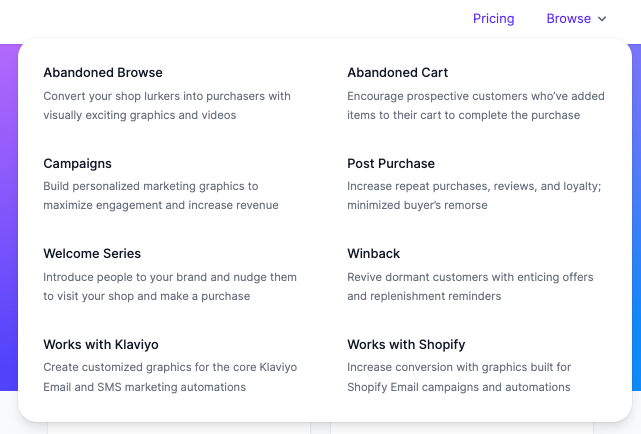
You can also visit any of these Collection Pages directly to start customizing graphics:
[Abandoned Browse](https://www.gridandpixel.com/abandoned-browse?utm_source=helpcenter&utm_medium=article&utm_campaign=findinggraphics)
[Abandoned Cart](https://www.gridandpixel.com/abandoned-cart?utm_source=helpcenter&utm_medium=article&utm_campaign=findinggraphics)
[Campaigns](https://www.gridandpixel.com/campaign?utm_source=helpcenter&utm_medium=article&utm_campaign=findinggraphics)
[Post Purchase](https://www.gridandpixel.com/post-purchase?utm_source=helpcenter&utm_medium=article&utm_campaign=findinggraphics)
[Welcome Series](https://www.gridandpixel.com/welcome-series?utm_source=helpcenter&utm_medium=article&utm_campaign=findinggraphics)
[Winback](https://www.gridandpixel.com/winback?utm_source=helpcenter&utm_medium=article&utm_campaign=findinggraphics)
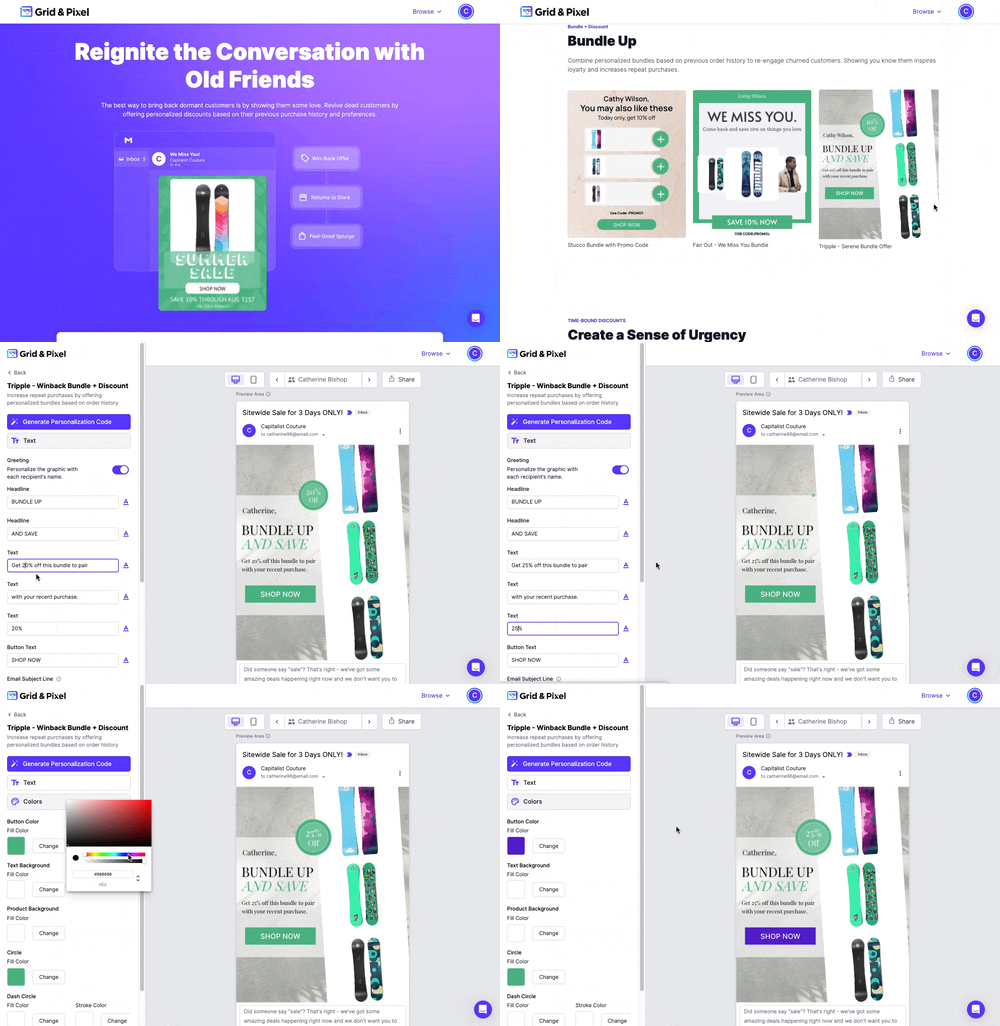
On each Collection Page, you'll see a library of customizable designs broken down by different use cases. For instance, on the Winback page, you'll see designs specifically for special promotional codes, replenishment orders, and personalized bundles to win back lapsed users and previous purchasers.
Select the Collection Page that aligns with the email you're building and browse the designs.
## [Copy link](https://help.gridandpixel.com/how-to-tutorials/how-to-find-graphics-to-customize?hsLang=en-us#h_9522ef0225)3. Tap on the design to start customizing
Simply tap the design that you want to customize, and you'll be taken to our editor to make any tweaks to the graphic before exporting it.
[.png?width=129&height=20&name=Grid%20%26%20Pixel%20Logo%20(1).png "Grid & Pixel Logo")](https://gridandpixel.com)
[mailto:support@gridandpixel.com](mailto:support@gridandpixel.com)
Copyright © 2026 Grid & Pixel, Inc. All rights reserved.