---
title: How to Add Grid & Pixel Graphics to Your Klaviyo Emails with Live Embed Code
description: Publish personalized Grid & Pixel graphics in a Klaviyo email with live embed code. Follow the setup steps for email campaigns and flow messages.
---

[Skip to content](https://help.gridandpixel.com/en-us/grid-and-pixel-help-center/how-to-tutorials/how-to-add-grid-pixel-graphics-to-your-klaviyo-emails-with-live-embed-code#main-content)

English - United States

Show submenu for translations

[![Grid & Pixel Logo](https://help.gridandpixel.com/hs-fs/hubfs/Grid%20%26%20Pixel%20Logo%20(1).png?width=226&height=35&name=Grid%20%26%20Pixel%20Logo%20(1).png)](https://gridandpixel.com)

Open main navigation

Close main navigation

- English - United States
  
  Show submenu for translations
- [Contact support](https://help.gridandpixel.com/en-us/grid-and-pixel-help-center/contact-us/contact-us)

[Contact support](https://help.gridandpixel.com/en-us/grid-and-pixel-help-center/contact-us/contact-us?hsLang=en-us)

 Grid & Pixel Help Center

- There are no suggestions because the search field is empty.

1. [Grid & Pixel Help Center](https://help.gridandpixel.com/en-us/grid-and-pixel-help-center?hsLang=en-us)
2. [Email, SMS & Design](https://help.gridandpixel.com/en-us/grid-and-pixel-help-center/email-sms-design?hsLang=en-us)

November 24, 2026

# How to Add Grid & Pixel Graphics to Your Klaviyo Emails with Live Embed Code

## Generate the Klaviyo email embed for the design, add it to the intended email and preview with a profile that has the fields it uses.

<iframe class="hs-responsive-embed-iframe hs-fullwidth-embed" height="315" src="https://www.youtube.com/embed/H1ocHKKkP98?modestbranding=1&amp;rel=0" style="position: absolute; top: 0; left: 0; width: 100%; height: 100%; border: none;" width="560" data-service="youtube"></iframe>

There’s a lot to love about [Grid and Pixel](https://www.gridandpixel.com/?utm_source=helpcenter&utm_medium=gridandpixel)’s personalized email graphics, but we think the easy implementation is something you’ll really adore.

It only takes *seconds* to add your customized graphic to your customer engagement platform. Plus, if you use Klaviyo, those email graphics are powered by an AI product recommendation engine that will analyze where the graphic is added and choose the most relevant products and destination links for each recipient based on prior behavior, purchase history, demographics, and more.

Here’s all you need to do:

### 1. Generate your code snippet

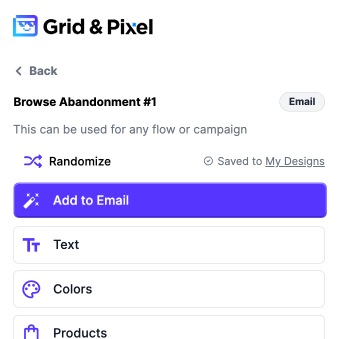
When you’ve customized your graphic and are ready to add it to your email, click the purple '**Add to Email**' button at the top-left of the graphic editor. (If you are editing an SMS design, this button will say '**Add to SMS**')
![Group 5](https://help.gridandpixel.com/hubfs/Knowledge%20Base%20Import/Group_5.png)

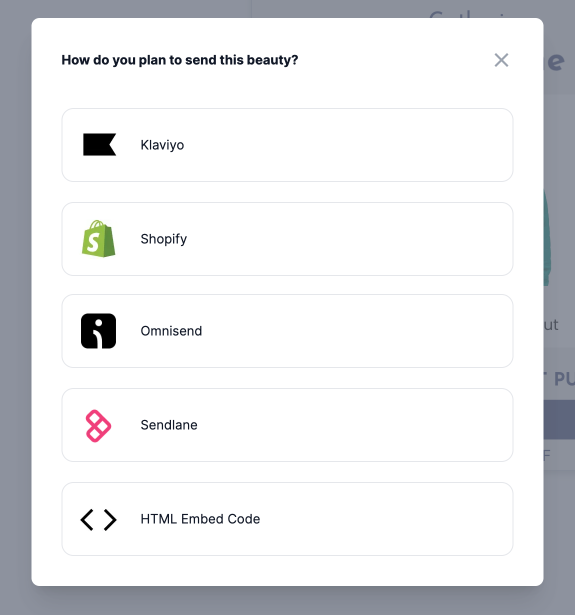
### 2. Select Klaviyo

![Group 6](https://help.gridandpixel.com/hubfs/Knowledge%20Base%20Import/Group_6-2.png)

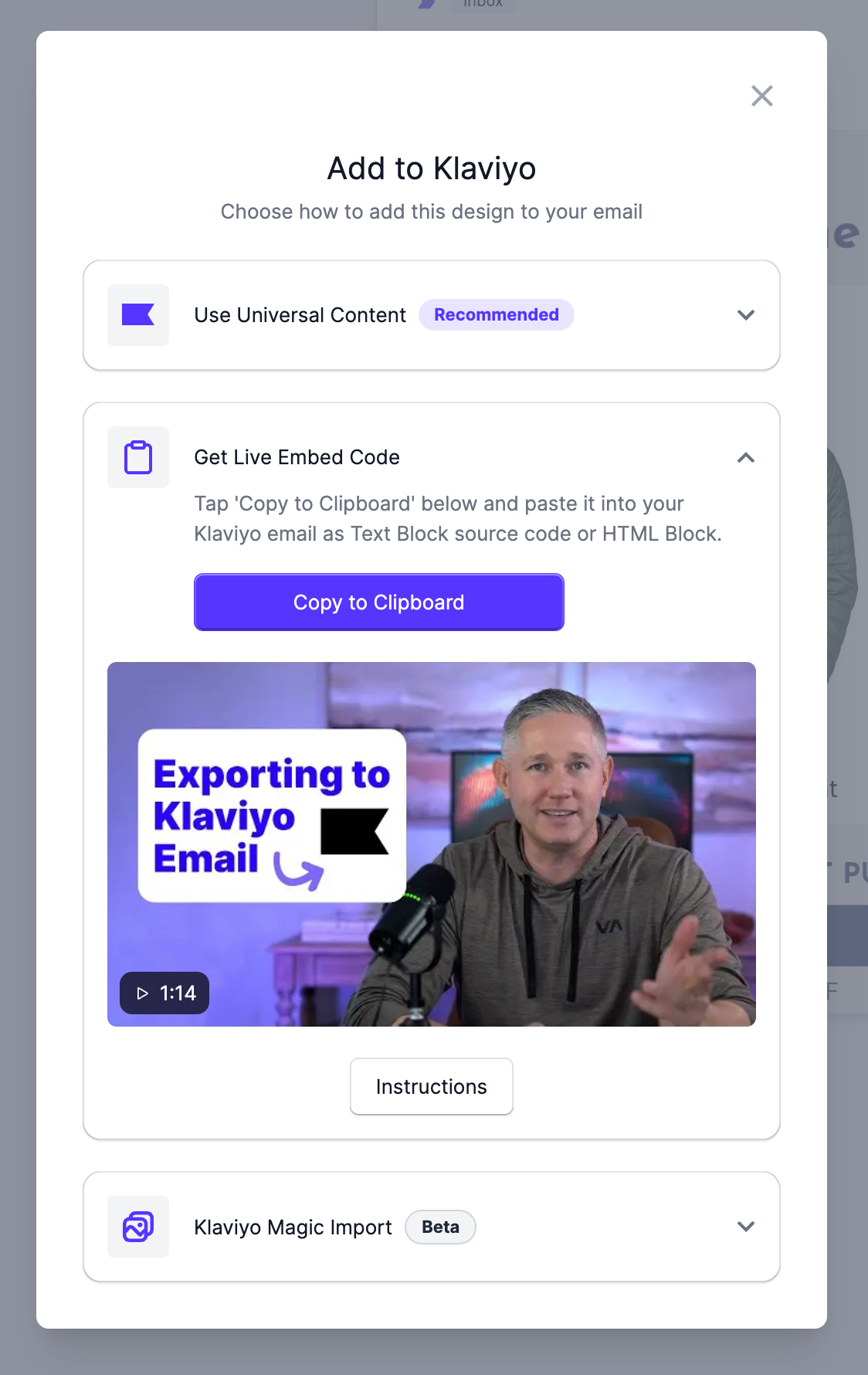
### 3. Open Get Live Embed Code option

Then click **Copy to Clipboard** to copy the snippet.
![Screenshot 2024-07-11 at 9.35.11 AM](https://help.gridandpixel.com/hubfs/Knowledge%20Base%20Import/Screenshot_2024-07-11_at_9_35_11_AM.png)

### 4. Paste the code snippet

Inside Klaviyo, find the email where you’ll be adding the graphic, either by going to the Campaigns or Flows section.

Open the email and click **Edit Email**.

**If your Klaviyo does NOT offer an HTML block option:**

Drag over a **Text** block and drop it into your template and click the **Source code** drawer of the text editor.

Remove this default source code: 

```
<div>This is a text block. Double click here to edit it...</div> 
```

Then, paste the code snippet.

```

```

**If your Klaviyo DOES offer an HTML block option:**

Drag over an **HTML** block and drop it into your template and then remove this default source code:

```
<strong>HTML Block</strong
```

Then, paste the code snippet.

![Pasting Klaviyo Live Embed Code - HTML block](https://help.gridandpixel.com/hubfs/Knowledge%20Base%20Import/Pasting_Klaviyo_Live_Embed_Code_-_HTML_block.gif)

### 5. Adjust the block padding

Klaviyo adds default padding to text blocks in email, so you’ll want 0 padding so the graphic goes to the edge of your email. Remove any extra padding and voila!

![Screenshot 2023-06-07 at 4.33.52 PM](https://help.gridandpixel.com/hubfs/Knowledge%20Base%20Import/Screenshot_2023-06-07_at_4_33_52_PM.png)

### 6. Preview and test

Hit the **Preview and test** button to review the graphic and send yourself a test to make sure it’s exactly as you wanted. You'll be able to cycle through your customers who match the campaign or flow segmentation criteria, so you can get a live look at how the email will look for different subscribers.

If you’re adding your graphic to a flow, you’ll see that the name *and* product imagery will change dynamically depending on the user’s browsing and purchase history.

### Adding graphics to SMS

**Want to add a Grid & Pixel graphic to an SMS in Klaviyo?** [Read our full guide here.](https://help.gridandpixel.com/en-us/grid-and-pixel-help-center/how-to-tutorials/how-to-add-grid-pixel-graphics-to-your-klaviyo-sms-campaigns-flows-with-live-embed-code?hsLang=en-us)

For the difference between an embed and an exported design, see [how live embed code publishes your designs](https://help.gridandpixel.com/en-us/grid-and-pixel-help-center/how-to-tutorials/how-it-works-live-embed-code-publishing-your-designs?hsLang=en-us). To reuse the same block across emails, [sync your design to Klaviyo as universal content](https://help.gridandpixel.com/en-us/grid-and-pixel-help-center/how-to-tutorials/how-to-instantly-sync-your-designs-to-klaviyo-as-universal-content-blocks?hsLang=en-us).


[![Grid & Pixel Logo](https://help.gridandpixel.com/hs-fs/hubfs/Grid%20%26%20Pixel%20Logo%20(1).png?width=129&height=20&name=Grid%20%26%20Pixel%20Logo%20(1).png "Grid & Pixel Logo")](https://gridandpixel.com)

[Contact Grid & Pixel support](https://help.gridandpixel.com/en-us/grid-and-pixel-help-center/contact-us/contact-us?hsLang=en-us)

[TikTok Shop tools](https://www.gridandpixel.com/tiktok) · [Klaviyo welcome flows](https://www.gridandpixel.com/welcome-series) · [AI email for Klaviyo](https://www.gridandpixel.com/ai-email-mcp)

<https://www.linkedin.com/in/loumintzer/> <https://www.facebook.com/profile.php?id=61559185648917> <https://www.instagram.com/dtclou/> <https://www.gridandpixel.com/> [mailto:support@gridandpixel.com](mailto:support@gridandpixel.com)

Copyright © 2026 Grid & Pixel, Inc. All rights reserved.